Exclusive Upgrade For BrowserPilot AI Customers Only — This offer disappears when you leave this page
ShortStoryEngine
RebranderClub
Prompt Vault
Complete Setup
OTO · Personal Prompt Library
Build Your Own Private Prompt Swipe File… And Never Lose A Great Prompt Again
Instantly save any prompt you find while browsing, build a growing personal library of AI shortcuts, and turn random online discoveries into permanent assets you can reuse again and again.
One-Click Prompt CapturePrivate In-Browser LibraryExport Any TimeWorks With ChatGPTOne-Time Upgrade
Add it now — or keep losing great prompts to the void.
The Real Power Of AI
You Already Understand Something Most People Haven't Figured Out Yet
By the time anyone reaches this page, they already get it.
The real power of AI isn't just having access to it. It's having the right instructions, the right shortcuts, and the right workflows ready when you need them.
That's why you picked up BrowserPilot AI. That's why the Workflow Library made sense.
Speed matters. Flow matters. Less friction matters.
But here's the one problem that follows serious AI users everywhere, no matter how good their tools get:
"They find remarkable prompts. Ones that actually work. Ones worth keeping. And then they lose them."
Not because they're careless. Because they don't have a system built for this specific problem.
So they do what everyone does. They spot something worth keeping while browsing a thread, a newsletter, a training group, a sales page, a blog comment. They think: "I need to save that."
And they save it the only way they know how:
Copy into a messy Google doc
Dump it into Notes or Notion
Save a random bookmark
Message it to themselves
Paste it into a spreadsheet
Tell themselves they'll come back
Screenshot it on their phone
Drop it in a Slack DM to self
And then?
It gets buried. Forgotten. Lost. Or joins the graveyard of that giant chaotic file they never actually search properly.
Every strong prompt you lose is a lost shortcut. A lost asset. A lost advantage. A lost future workflow. And the more seriously you use AI, the more expensive that becomes.
Introducing
AI Where You Work: Prompt Vault
The browser-based prompt collector that helps you save, organize, and reuse your best prompts the moment you find them online — so you can build your own permanent, private AI asset library.
Most AI Users Keep Repeating The Same Expensive Loop
Gary Halbert was famous for saying that most people don't have a problem-solving problem — they have a system problem. The solution exists. They just don't have the infrastructure to capture and use it consistently.
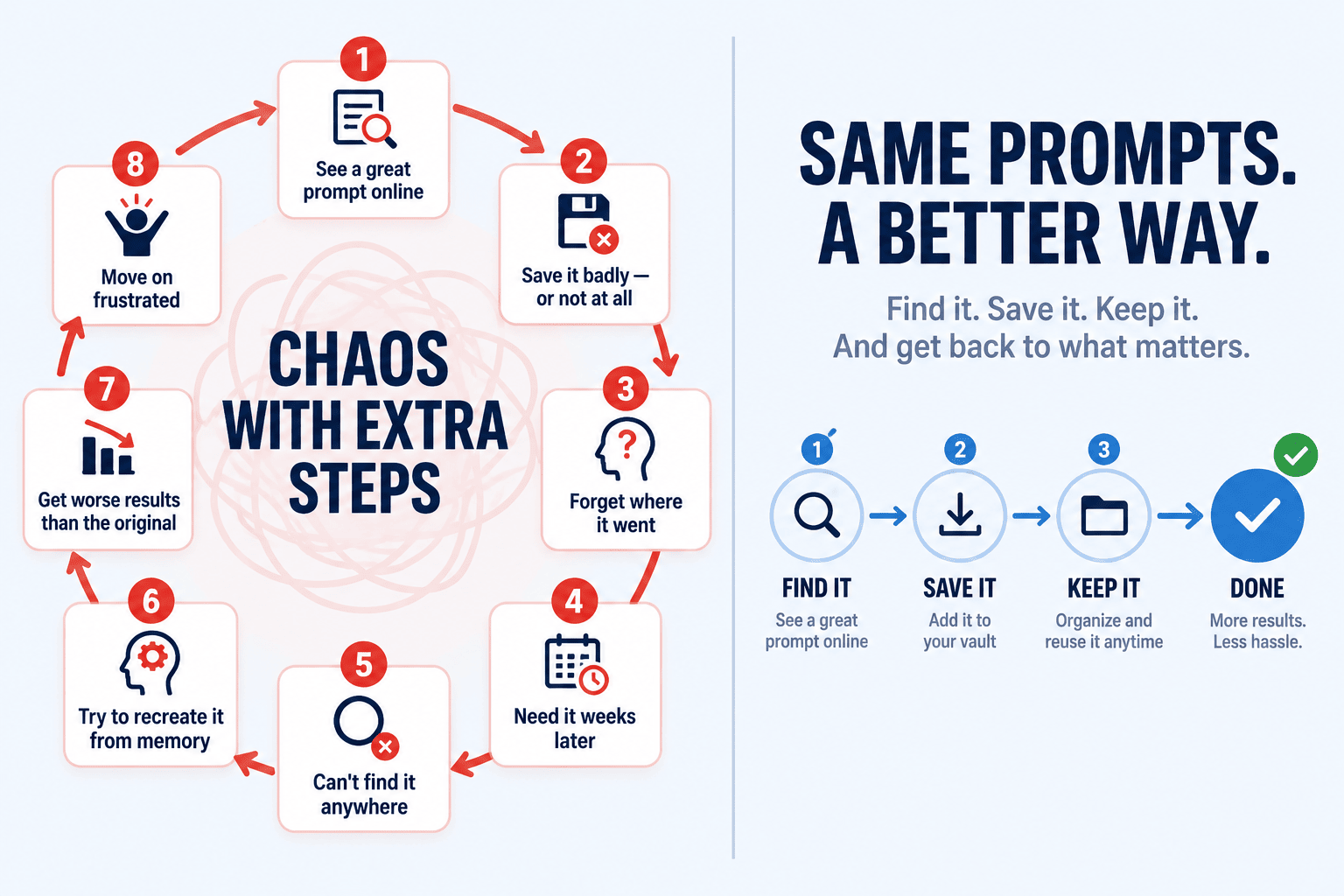
Sound familiar? This is the loop most AI users are stuck in right now:
Eight steps that end exactly where they began.
1See a great prompt online
2Save it badly — or not at all
3Forget where it went
4Need it weeks later
5Can't find it anywhere
6Try to recreate it from memory
7Get worse results than the original
8Move on frustrated — and repeat
That is not leverage. That is chaos with extra steps.
And if you are serious about using AI for marketing, content, copy, publishing, client work, product creation, or business growth — you need more than random prompt clutter spread across tabs, bookmarks, docs, note apps, email drafts, screenshots, and half-finished files.
You need a library. A real one. A place where useful prompts get captured on the spot, stored cleanly, and reused when you need them.
Because here's the thing most people never stop to consider:
"Good prompts are not disposable. They are reusable assets. And reusable assets compound."
Every strong prompt you find and actually keep is future leverage. The more you collect, the less you start from scratch. The less you start from scratch, the faster you move. The faster you move, the more you produce. That compounding effect is real — but only if you have a system to capture it.
How It Works
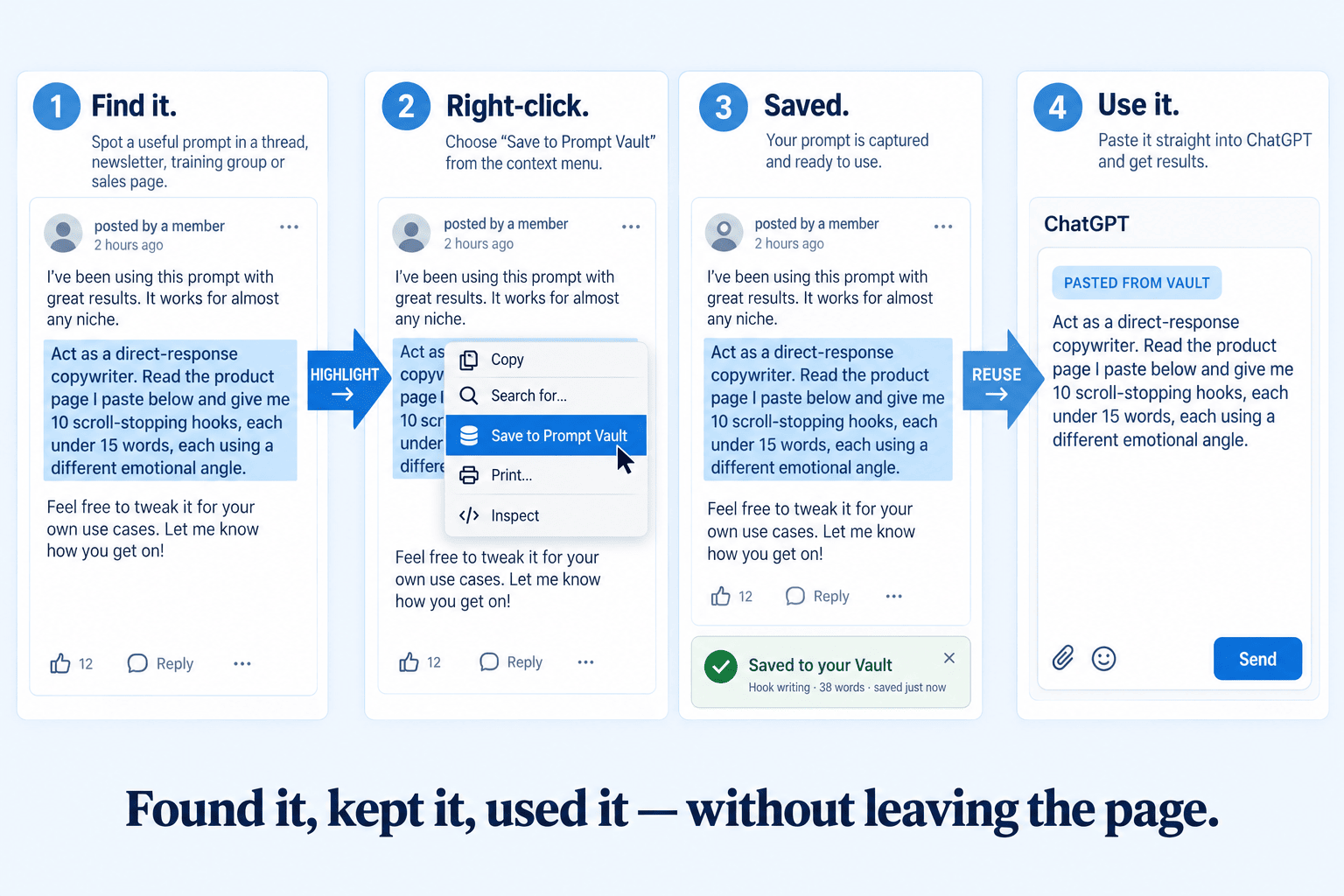
The "Highlight → Save → Reuse" System. Ridiculously Simple.
There is no learning curve. No complex setup. No prompt-writing required. You already know how to highlight text and right-click. That's genuinely all of it. The Vault handles everything else.
🌐
Find It
Spot a great prompt anywhere on the web — a thread, blog, newsletter, forum, sales page
🖱️
Capture It
Highlight the text, right-click, and save it to the Vault in one motion
🗄️
Store It
It's instantly saved to your private library inside the browser — organized, clean, ready
⚡
Reuse It
Open the Vault any time, grab the prompt, and use it in ChatGPT or wherever you work
Highlight, right-click, saved. Then straight back out into ChatGPT when you need it.
01
Highlight any prompt on any webpage
You're browsing a thread, reading a newsletter, scanning a training group. You spot something worth keeping.
02
Right-click and save it to the Vault
One right-click. One selection. The prompt is captured instantly without interrupting what you're doing.
03
It's stored in your private browser library
No copy-pasting into a doc. No tab-switching. No messy system to maintain. It lives in the Vault, where you can find it.
04
Open the Vault whenever you need it
Browse your saved collection, copy any prompt, manage your library, or export the whole thing as a .txt file.
05
Reuse your best prompts again and again
On the ChatGPT website, paste saved prompts directly into the input box. Every saved prompt becomes a permanent tool in your stack.
No messy process. No random copy-paste juggling. No "where did I save that?" problem. No broken system. Just a fast, simple way to capture useful prompts while you are already browsing — and build a library that gets more valuable every week.
The Prompts You'll Capture
Once You Start Paying Attention, You See Them Everywhere
Most people massively underestimate how many useful prompts they encounter online. Until they start actually looking. Because once you know what to look for — they're in every thread, every training group, every newsletter, every sales page, every YouTube description.
Some are average. Some are junk. But some are genuinely gold. And when you find one of those — you don't want to trust your memory with it. You want to keep it, build on it, and use it again.
The gold ones — the ones that become repeatable workflow anchors — are worth far more than whatever you paid for them. The Vault makes sure you don't have to rediscover them the hard way.
The Real Difference
Prompt Discovery Without A System. vs. Prompt Discovery With The Vault.
This is the strategic shift the Vault creates. It sounds simple. But Soren Jordansen always said the biggest performance gap between AI power users and everyone else isn't talent — it's infrastructure. The people who compound their results fastest are the ones who keep what works.
✗ Without The Vault
Find useful prompts but most disappear within 48 hours
Scattered across five different apps, none organized
Start from scratch on every AI task, every time
Recreate prompts from memory and get worse results
Waste time hunting for something you know you saved
Prompt collection stays random and never compounds
Valuable finds evaporate — no infrastructure to hold them
✓ With The Vault
Every great prompt gets captured the second you find it
One clean library inside your browser — always findable
Your best prompts become permanent reusable tools
Use proven prompts again and get consistent results
Open the Vault, grab what you need, keep moving
Your collection grows and compounds over time
Browsing the internet becomes active asset building
That last point is the real shift. Without the Vault, browsing is just browsing. With it, every hour you spend online has the potential to add to your permanent AI toolkit. That changes the ROI on time you're already spending anyway.
In The Real World
This Is What The Vault Looks Like On A Typical Day
These aren't engineered scenarios. These are the exact moments that happen to affiliate marketers, KDP publishers, digital product vendors, local agency owners, and content creators every single day they're online.
You're in a Facebook group and someone shares a killer hook-writing prompt that generates ten scroll-stopping angles from a single product page. You know you'll want this again.
Save It →
You're reading a blog post about email marketing and spot a prompt sequence that builds a full 5-email launch campaign from a product description. That's weeks of workflow, compressed.
Save It →
You're in a KDP research thread and someone drops a prompt that reverse-engineers reader pain points from Amazon reviews and converts them into book angles. You've been looking for exactly this.
Save It →
You find a local agency audit prompt hidden inside someone's training video description — one that generates a full local business gap analysis from a single URL.
Save It →
You're reading a PLR seller's newsletter and they share the exact system prompt they use for rebranding content. It's buried in the text but it's genuinely useful.
Save It →
You're watching a YouTube video transcript and the creator mentions the prompt framework they use to generate short-form video scripts from long-form content.
Save It →
Now instead of trusting your memory, or hoping you can find it again by scrolling back through weeks of posts — it's in your Vault. Tagged. Organized. Ready when you need it. That changes how useful the internet becomes. Because now browsing isn't just browsing. It's collecting.
The Compounding Effect
The Vault Doesn't Just Save Prompts. It Builds Infrastructure.
Here's what most people miss about a well-organized prompt library: it's not a static collection. It's a compounding system.
Week one, you've saved 8 prompts. Useful, but modest. Week four, you've got 40. You're starting to notice patterns — your best hooks come from 3 specific prompt frameworks. Month three, you've got 150+ prompts, organized, exportable, reusable. You're building custom workflow stacks by combining saved prompts. You're producing faster than you ever have.
Your Vault Gets More Valuable Over Time
Week 1
~8
Month 1
~40
Month 3
~150
Month 6
300+
Other AI tools get used once and forgotten. The Vault becomes more valuable every week you use it — because every saved prompt adds to your system. That's the difference between a tool and infrastructure.
Advanced AI users don't find something brilliant once. They build a system that lets them keep and reuse brilliance. That's exactly what the Vault is for.
You've got BrowserPilot AI. You've got the Workflow Library. Now build your own collection too.
The prompts you find tomorrow could still be helping you six months from now — if you actually keep them.
Highlight any prompt on any webpage and save it to your Vault with a single right-click. No forms, no tabs, no friction. It's captured before you've finished reading the page.
📚
Private Prompt Library UI
Open your Vault any time to browse everything you've saved. Clean, organized, searchable. Your growing personal collection of AI shortcuts in one place.
📋
One-Click Copy
Grab any saved prompt and put it to work immediately. No hunting through notes or scrolling through old files. Find it, copy it, use it.
🤖
Direct Paste To ChatGPT
On the ChatGPT website, select any saved prompt and paste it directly into the input box. From your Vault to ChatGPT in one action — no copy-paste juggling.
📤
Export Your Library
Download your entire saved prompt collection as a .txt file whenever you want. Your library is always yours — portable, shareable, and permanently backed up.
🗂️
Manage & Curate
Delete individual prompts you no longer need, or clear the whole Vault and start fresh. You're always in control of what stays and what goes.
✅
Clean Prompt Handling
Saved prompts preserve formatting and line breaks properly — so what you capture is what you get when you reuse it. No broken formatting, no garbled instructions.
🌐
Full Browser Integration
Works right inside BrowserPilot AI. No new logins, no extra apps, no switching context. It's already there where you work — available the moment you need it.
Everything You Get
Stop Losing Prompts. Start Building Your Swipe File.
This is the complete picture of what changes the moment you add the Prompt Vault to your BrowserPilot AI toolkit:
Save useful prompts instantly while browsing — no interruption to your workflow
Build your own private AI swipe file that grows stronger every week
Stop losing winning prompts in messy notes, random docs, and forgotten bookmarks
Create a permanent collection of reusable AI shortcuts that compound over time
Keep your best prompt discoveries in one organized, findable place
Reuse proven prompts faster and get more consistent, higher-quality outputs
Export your full library at any time — it's always yours to keep
Paste saved prompts directly into ChatGPT with one click
Turn random online discoveries into permanent, searchable assets
Build a smarter AI system one saved prompt at a time — without starting from scratch
"The best prompt is the one you can still find when you need it. Discovery without capture is wasted potential."
Free Bonus Included Today
Never Run Out Of AI Prompt Ideas Again
Included today: where to go looking in the first place.
Prompt Vault gives you the system to save, organize, and reuse every great prompt you find.
But here's the natural question that follows:
Where do you find more?
More prompt ideas. More angles. More examples. More ways to use AI for content, marketing, SEO, productivity, offers, products, images, research, and everyday business tasks.
That's exactly what this bonus covers.
"Most people get stuck because they don't know what to ask AI. They open ChatGPT… stare at the blank box… and type something weak. Then wonder why AI isn't helping them."
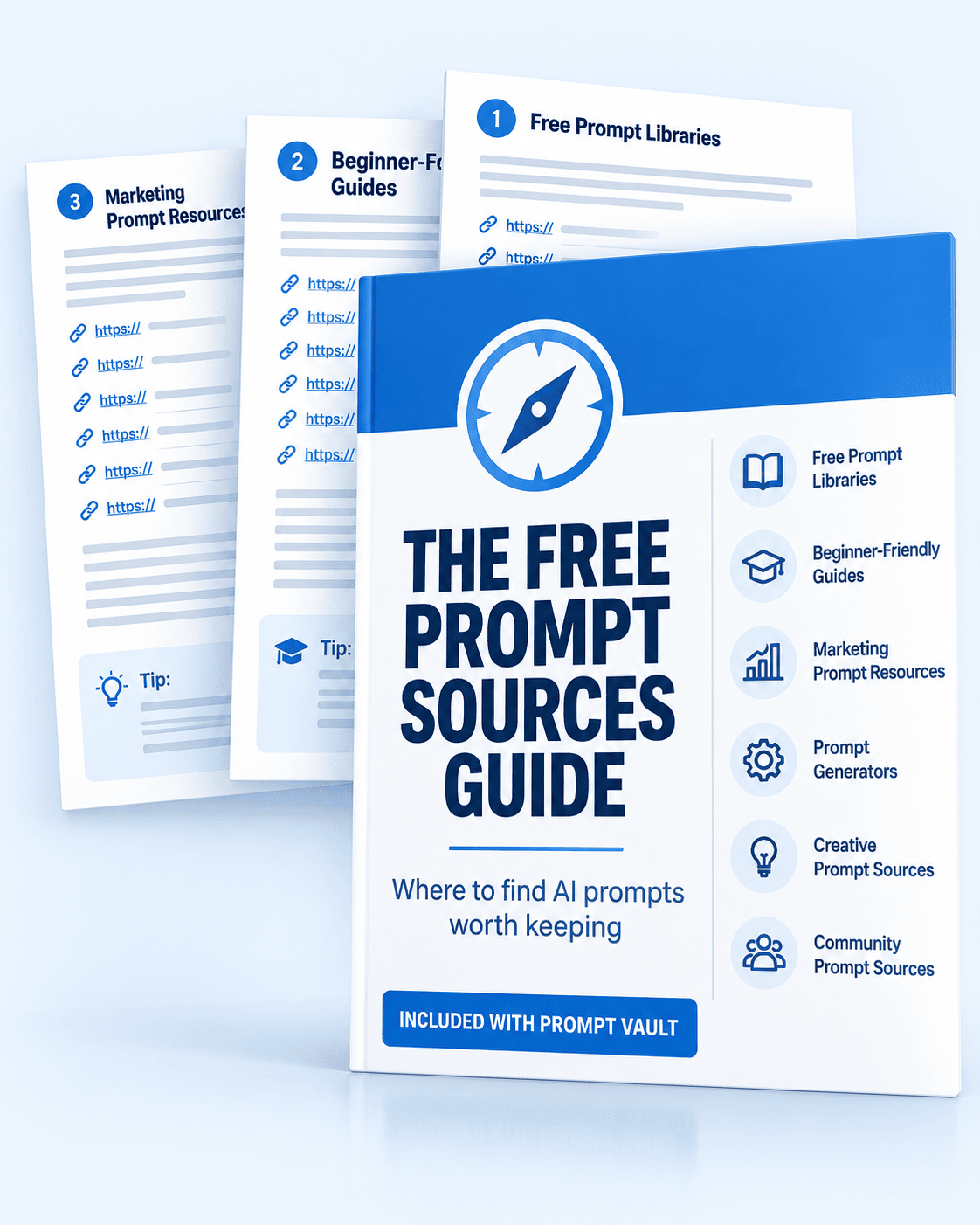
The Free Prompt Sources Guide is a short, practical reference — a curated list of the best free places online to find AI prompts, prompt examples, and prompt generators.
No endless searching. No random junk. No wasting hours figuring out which sites are actually worth visiting. Just a clean, direct guide pointing you to useful free prompt resources you can start using immediately.
📚
Free Prompt Libraries
Browse curated collections of ready-to-use prompts for instant ideas — organized by use case and goal.
🎓
Beginner-Friendly Guides
Resources that show you how better prompts are actually built — not just lists, but the structure behind them.
📣
Marketing Prompt Resources
Sources specifically covering content, SEO, campaigns, productivity, and business growth — where the real work happens.
⚙️
Prompt Generators
Tools that help turn a rough idea into a properly structured, usable prompt — without guessing.
🎨
Creative Prompt Sources
Image generation, writing, and content inspiration — for the visual and creative side of your AI workflow.
🌐
Community Prompt Sources
Real users sharing what they're actually testing right now — current examples, niche workflows, and live experiments.
Every resource includes a bare URL — so you can copy, save, and visit each one fast. No hunting. No paywalls. No fluff.
✗ Without The Guide
Staring at a blank ChatGPT box with no idea what to ask
Wasting time searching randomly and finding mostly junk
Starting from scratch every time you need a new prompt
Getting weak outputs because your prompts are too vague
Never knowing which prompt sources are actually worth using
✓ With The Guide
A short list of the best free places to find real prompt ideas
Prompt examples that show you how better prompts are structured
Marketing, SEO, image, and content sources in one place
Community sources where people share what's working right now
A reliable starting point whenever inspiration runs dry
Think of it this way: Prompt Vault gives you the system to keep every great prompt you find. The Free Prompt Sources Guide gives you more places to find them.
Together, they stop the two problems that slow most AI users down: losing prompts they've found, and not knowing where to look for more.
🎁
Free Prompt Sources Guide — Included With Prompt Vault Today
You get the Free Prompt Sources Guide included when you add Prompt Vault to your order. Use it to find more prompts, study how better prompts are built, and get more mileage from every AI tool you already use.
The Offer
What A Well-Organized Prompt Library Is Actually Worth
Consider the chain: a strong prompt shortcut saves time. Time saved becomes output. Output becomes results. Results become revenue. That chain is real — but only if you have a system to capture the prompts that start it.
If the Vault only helped you recover and reuse one great email prompt, one killer headline prompt, one useful offer prompt, one solid research prompt — it could justify itself the same day you add it.
What You Get
Value
Prompt Vault Browser ExtensionFull prompt capture, library, and management system built into BrowserPilot AI
$47
One-Click Capture From Any WebpageHighlight and save any prompt in a single right-click — no interruption, no friction
$27
Private In-Browser Library + Management UIBrowse, copy, delete, and organize your saved prompts in one clean, always-accessible place
$27
Export-To-TXT + Direct ChatGPT PasteDownload your full library any time, or paste saved prompts directly into ChatGPT in one click
$17
🎁 Bonus: Free Prompt Sources GuideA curated guide to 11 free prompt libraries, generators, and communities — so you never run out of fresh prompt ideas
Free
Total Value$136
🛡️
The "Build It Or It's Free" Guarantee
Add the Vault to your toolkit. Start saving prompts as you browse. Build your collection for a few weeks. If you don't find it genuinely useful — if it doesn't become a natural part of how you use AI — just let us know within 30 days and we'll refund you in full. No questions, no process, no awkwardness. We're confident you'll use this every time you find something worth keeping.
Your Decision
Start Building Your Own Private Prompt Swipe File Today
You've got the tool. You've got the workflows. The Vault is what turns your time browsing the internet into a compounding AI asset library — one saved prompt at a time.
One-Time Upgrade Price
$47
One payment. Yours to keep. Gets more valuable every week.
The Prompt Vault is a browser-based prompt collector built into BrowserPilot AI. It lets you highlight any prompt you find on a webpage, save it to your private in-browser library with a single right-click, and reuse it later — without switching tabs, opening another app, or maintaining a messy external notes system.
What does it actually save?
It saves highlighted text from webpages — specifically prompt text you want to keep and reuse. Formatting and line breaks are preserved properly, so the prompt looks the same when you retrieve it as it did when you found it.
How is this different from just using a notes app or Google Doc?
Three things make this meaningfully different. First, capture is one right-click — you don't switch apps or interrupt your browsing flow. Second, everything is in one organized place inside your browser, not scattered across tabs and apps. Third, the direct paste-to-ChatGPT feature means saved prompts go from your Vault to ChatGPT in a single action — no copy-paste juggling between windows.
Can I organize and manage what I save?
Yes. You can view your full saved collection, copy individual prompts, delete ones you no longer want, and clear the entire Vault when you want to start fresh. The library stays clean and manageable as it grows.
Can I export my prompt collection?
Yes. Export your full saved prompt library as a .txt file at any time. Your collection is always yours — portable, shareable, and backed up whenever you want it.
Does it work with ChatGPT?
Yes. When you're on the ChatGPT website, you can select any saved prompt from your Vault and paste it directly into the ChatGPT input box. From saved to running in one action.
Do I need the Workflow Library (OTO1) for this to work?
No — the Vault works independently as part of BrowserPilot AI. That said, the two work exceptionally well together. The Workflow Library gives you 240 ready-made workflows to start with. The Vault lets you build your own growing collection on top of that — the natural next step for serious users.
Who is this best for?
Anyone who regularly encounters useful prompts online and wants a reliable system for keeping them. That includes affiliate marketers, KDP and self-publishing authors, digital product creators, course sellers, local agency owners, PLR sellers, social media managers, newsletter publishers, coaches, and any online business owner who uses AI seriously enough to care about getting consistent results.
Is this just another save-text browser extension?
No. This is built specifically for the prompt collection and reuse workflow — inside the BrowserPilot AI extension you already have. The direct ChatGPT paste, the clean formatting preservation, and the integration with your existing browser AI workflow make it a fundamentally different experience from a generic text saver.
Is this a monthly subscription?
No. This is a one-time upgrade offer available only on this page. You pay once and the Vault is yours permanently — no recurring charges, no renewal, no subscription creep.
The Prompts You Find Tomorrow Could Still Be Working For You In Six Months
But only if you actually keep them. Every great prompt you lose is future leverage thrown away. The Vault closes that leak — and turns every hour you spend browsing into active asset building.